
Custom sections (x-tagGroups)
x-tagGroups is a vendor-specific property that helps to define custom sections in the navigation part of your documentation. Instead of the default “Endpoints” or “Webhooks” sections (for REST APIs) or “Channels” (for Message Driven APIs), you can create your own set of sections which will contain the tagged operations of your choice.
If your API document uses OpenAPI 3.2, prefer the native tag hierarchy (
parentandkindproperties of the Tag Object) overx-tagGroups. See Nested tag structures.
x-tagGroupsonly applies when your documentation uses the “Automatic” or “Group by tag” grouping mode. In “Group by path” mode, custom sections are ignored. You can change this from the “Customize UI” tab of your documentation settings: see Operations and navigation.
Use the x-tagGroups property at the root level of your API document. The x-tagGroups property accepts an array of tag group objects which are defined as such:
| Property | Type | Description |
|---|---|---|
| name * | String | Name of the custom section. |
| tags * | Array[String] | List of existing tags already defined in your API document to be included in this section. |
Example usage #
The following screen capture shows the rendering of three custom sections, each one containing a set of tags (grouping operations).
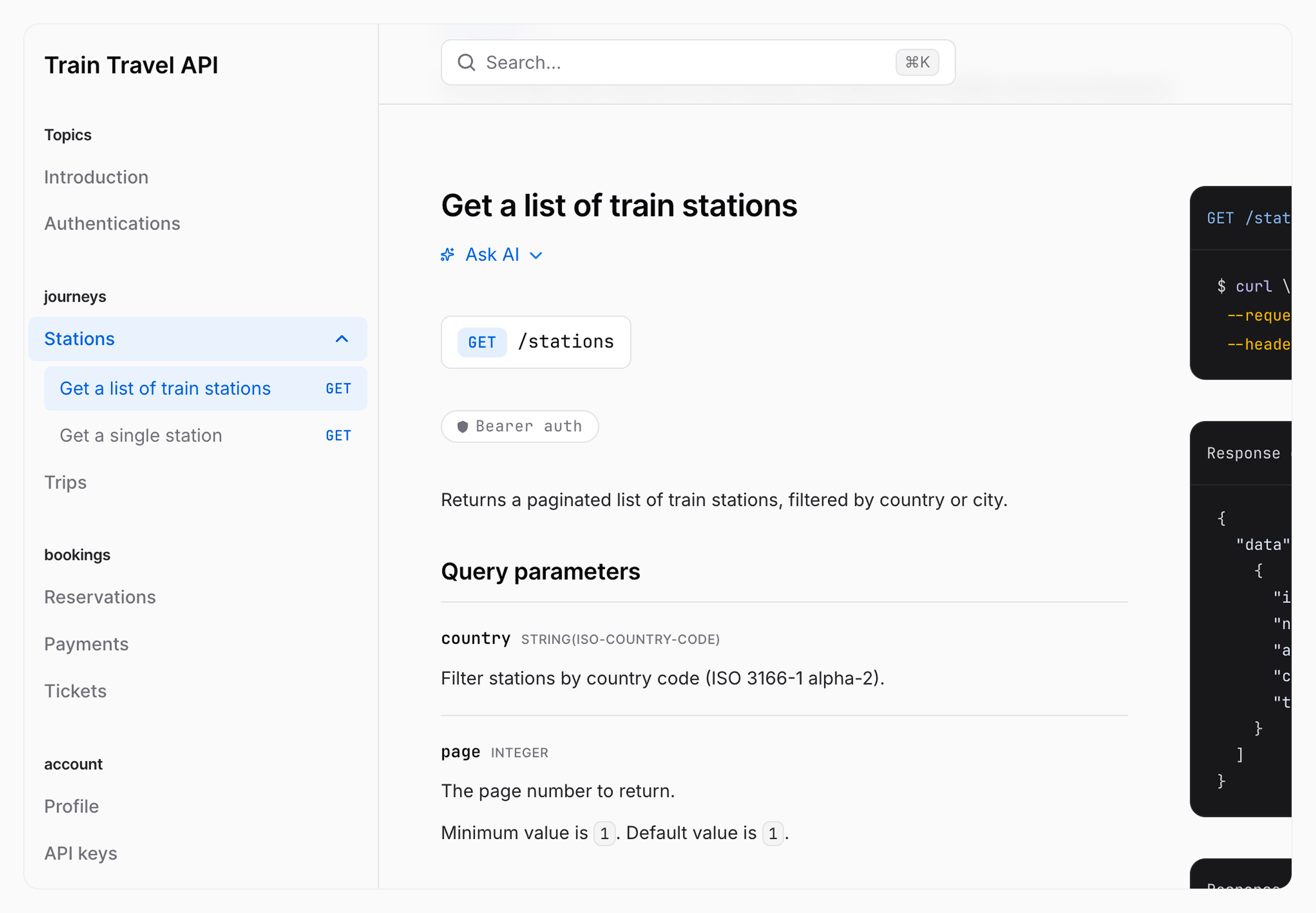
This is done with the following x-tagGroups array in your API definition:
x-tagGroups:
  - name: "journeys"
    tags: ["Stations", "Trips"]
  - name: "bookings"
    tags: ["Reservations", "Payments", "Tickets"]
  - name: "account"
    tags: ["Profile", "API keys"]
tags:
  - name: "Stations"
  - name: "Trips"
  - name: "Reservations"
  - name: "Payments"
  - name: "Tickets"
  - name: "Profile"
  - name: "API keys"
paths:
  /stations:
    get:
      summary: "Get a list of train stations"
      tags: ["Stations"]
      ...
  /trips:
    get:
      summary: "Get available train trips"
      tags: ["Trips"]
      ...
  /bookings:
    get: # Operation Object
      summary: "List existing bookings"
      tags: ["Reservations"]
      ...
    post: # Operation Object
      summary: "Create a booking"
      tags: ["Reservations"]
      ...
  /bookings/{bookingId}/payment:
    post:
      summary: "Pay for a booking"
      tags: ["Payments"]
      ...
  /bookings/{bookingId}/ticket:
    get:
      summary: "Download a ticket"
      tags: ["Tickets"]
      ...
  /me:
    get:
      summary: "Get the current traveller"
      tags: ["Profile"]
      ...
  /api-keys:
    get:
      summary: "List API keys"
      tags: ["API keys"]
      ...
Good to know #
Tags you don’t group are not hidden #
Tags that you don’t list in x-tagGroups keep being displayed in their default section (“Endpoints”, “Webhooks” or “Channels”, depending on the operation). Unlike some other documentation tools, you don’t need to list every single tag to get a complete navigation.
Sections and tags follow your document order #
Sections appear in the order in which you declare them in the x-tagGroups array. Within a section, tags appear in the order in which you list them in the tags property of that group.
Operations and webhooks can share a section #
A group is a list of tags, whatever those tags are attached to: a single custom section can therefore contain both regular operations and webhook operations.